Friday, June 26, 2009

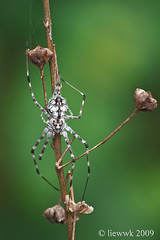
a spider shot that worth to share here ...

found this spider and think it worth to be share here ...

How do I make this shot ...

1. cut the stem using cutter
2. move it slowly to better BG
3. block the wind by 2 umbrella
4. setup tripod and shoot :D

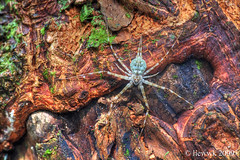
Tree trunk spider
4.20 Tree trunk spider ... re-PP...

4-5 days later I found this again at another reserve jungle (Hutan Lipur Sg Congkak @Ulu Langat) and it is not moving as previous so decide to have another HDR macro :D

4.20 Tree trunk spider ... HDR ...

Wednesday, June 3, 2009

MACRO PP : Focus Stack using Different Pictures

I am doing this ad-hoc (have plenty of topic are in the list). This is similar to another topic discuss in

http://liewwk-macro.blogspot.com/2009/01/how-i-increase-my-macro-picture-dof.html

in two situations as below

1. what if the bug move then how to apply the method apply above
2. a good composition pictures but not get main object focus... how ? delete it ?

so this topic help me to "rescue" above 2 problems

it is simple as step by step below
1. as this shoot when windy day + handheld + keep moving fly so the composition look ok but main object not focus as below


100% Zoom


2. I have a similar fly (similar angle is most important) shoot 1-2 weeks ago which got better eye focus but magnification are different


3. open the main composition picture as base


4. open the other "eye" picture and duplicate over the previous layer


then this layer will over write the main layer


5. set the opacity to 20-30%


then you will get this


look for "transform control" it different for CS3 & CS4 (this screen shot form CS4 and CS3 can get from "Edit" menu")


6. change the size of the picture if magnification different


-rotate it if the angle is not correct


7. adjust back opacity to 100%


8. add layer mask and make it invert


while invert of the layer mask, you will see


9. select a brush with "white" color by selection


10. zoom in to the eye


11. use smaller brush


12. brush out the area you interest , for this is head + eye


zoom out then you will see this


13. save the picture, let see the exif


14. easily verify by zoom 100%


so see the different ?

stack


original


some of you will say WOW, some will say "You Cheating" ....but this is rule of digital so we this is good to know :D

so have fun :D ...

Monday, June 1, 2009

MACRO PP : How I Increase my MACRO picture DOF (Stack Focus CZM)

This is continue another method of mine how to increase DOF but instead manually using CS3 layer mask method but this is using CombineZM(a freeware). it is much easier to use but it may need to combine this software & the previous method discuss @

http://liewwk-macro.blogspot.com/2009/01/how-i-increase-my-macro-picture-dof.html

as usual below is step by step for how I use CZM for additional info or discuss ca refer @ Macro Viewer-flickr


1. open CZM


2. create a new stack


3. choose those files you wish to stack


4. simply "do stack by" click as below


5. waiting it finish running batch processes and output should be massive with shadow due to not same angle or possition shots


6. do below to reduce the shadow, go to the frame and select the main frame you wish to be main BG


7. choose 2 points that significant appear at all pictures and select by choose key "1" then click "exit"


follow another point as "2" and Exit also on another point


8. repeat this by choose other frames


choose the same point where "1" & "2" but this turn use "3" & "4" and choose


but this time use "Set and Use Params" & click "ok" as window below


9. repeat all step "8" for all other frame

10. and do stack again


11. this time more cleaner picture will be out

12. I will use Photoshop "clone" to clone away the shadow and also some additional manual stack if need which can refer from

http://liewwk-macro.blogspot.com/2009/01/how-i-increase-my-macro-picture-dof.html


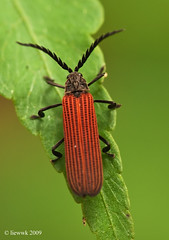
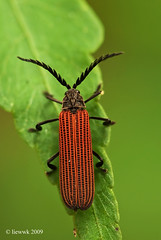
unstack version
2.13 Long-nosed Lycid Beetle ... non stack

stack version
2.13 Long-nosed Lycid Beetle ... stack
so enjoy ....

Wednesday, May 27, 2009

News - Genting Goes Green - Flora & Fauna Competition liewwk series

Edited .. update 11th June 2009
it is some winning pictures show @http://thestar.com.my/metro/story.asp?file=/2009/6/9/central/4062528&sec=central

We (gang of macro people) went to Genting 11-12th April 2009 for 2 days 1 night full shooting from morning till evening. And result had announce 2 days a go and nothing have won from the competition and would like to share my final submissions here to get some opinions from you all so I can improve further :D

Genting Goes Green - Flora & Fauna Competition - battle have began
- shooting this with natural light and the fly in the picture add some point for me to choose it to be final submission
- i like the soft light for this
Genting Goes Green - Flora & Fauna Competition - battle have began

Genting Goes Green - Flora & Fauna Competition - this is my lunch
- this guy is small while I shoot it ~3-4:1
- love this as it looking at my camera and i have the victim focus as well here
Genting Goes Green - Flora & Fauna Competition - this is my lunch

Genting Goes Green - Flora & Fauna Competition - landing
- spend my time to learn how this guy land on each dry leaf
- after spend few try this is the outcome but too bad some part of the wing got crop
- some how I like this shot very much
Genting Goes Green - Flora & Fauna Competition - landing

Genting Goes Green - Flora & Fauna Competition - symbol of "love"
- shoot this using burst mode + Natural light + handheld
- ~30 pictures shoot only 3 focus well
- 3 different BG but this Green one have my vote
Genting Goes Green - Flora & Fauna Competition - symbol of "love"

Genting Goes Green - Flora & Fauna Competition - little 8 eyes fellow
- not sure why, i just like this :D
Genting Goes Green - Flora & Fauna Competition - little 8 eyes fellow

Genting Goes Green - Flora & Fauna Competition - Robberfly - In Pey
- i got various angle of this Robberfly and cannot decide which is better so submit 2 of it :D
Genting Goes Green - Flora & Fauna Competition - Robberfly - In Pey

Genting Goes Green - Flora & Fauna Competition - Robberfly - In Pey


so please give me your comment so I can improve from here.. and really hope I will be free to go up to Genting on 1st June 2009 to view the winning pictures...

:(
Related Posts Plugin for WordPress, Blogger...